Dashboard Overview
Navigation
Once logged in, you'll see two main navigation elements:
- Top Admin Bar
- Located at the very top of the screen
- Black bar that stretches across the page
- Provides quick access to create new content
- Visible on both admin pages and your live website while logged in

- Left Sidebar Menu
- Contains all WordPress features and settings
- Access to pages, posts, media, and other content
- Shows settings for any installed plugins
- This is your main navigation for managing your website
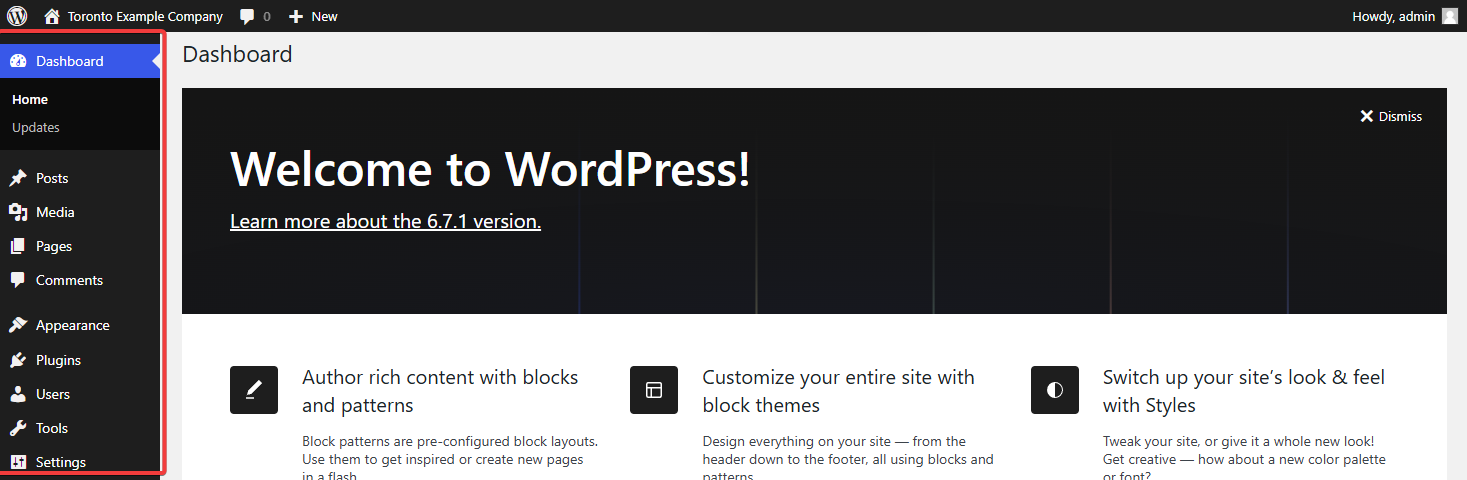
Understanding the Sidebar Menu
The sidebar menu contains various options, but as a website owner, you'll mainly work with Posts and Pages:
Main Menu Items:
- Dashboard: Overview of your website activity
- Posts: Where you create and manage blog posts
- Media: Your uploaded images and files
- Pages: Where you edit your website's main pages
- Appearance: Website design settings
- Plugins: Add-on features
- Users: User account management
- Tools: Import/export options
- Settings: Website configuration
What You Need to Focus On:
- Pages: Use this to edit your main website content
- Posts: Use this if you have a blog or news section
Detailed instructions for creating and editing Pages and Posts will be covered in the next tutorial.
Need Help?
If you have trouble logging in or need assistance, contact Alstra Solutions support team.